Sunday, October 21, 2007

Lucene indexes as agile databases

Download Source code

Introduction

In product development, as opposed to bespoke project development where each client gets its own software, you deliver the same software to each client. This has some advantages: single development stream, with multiple sales but in reality each client will want to be able
to customize its own product. Each will divide its products differently, will have different fields and if your product is not flexible enough to allow these policies they will reject your product.

Relation databases are not agile enough

In an agile manner, when developing a software project, you plan for change. In Extreme Programming, they say a piece of code has a good internal quality if it can be easily maintained, changed and debugged. In product development, the data store changes from one version to another and this is often a big burden. Relational databases simply haven't been designed to be easy to change their structure. Once an ALTER deletes a column, the entire database becomes unstable, you have to check each select, update, insert, each statement to make sure it doesn't crash. Migration scripts are hard to create and very error prone.
There are many workarounds, but none of them is trivial work.

ActiveDocument: Indexes as truly dynamic databases

Indexes were designed, having in mind that they need to search large repositories, extremely fast. Look at Google. It indexes over a billion websites and it is FAST.

Could an index be better structured the just having large quantities if text documents, for instance having types and properties, relations between entities, pretty much what a common relational database would have, and beyond that a truly flexible infrastructure, where typescan be created, modified and destroyed on the fly, where their properies could be added, removed or their names changed withought fear? Something that in C# would be like:


As it can be easly seen we create a type (Product) on the fly, with no need to define a table or any kind of structure, and then we add properties to the instances of this type, which can differ. Structure is actually defined and changed dynamically at runtime. The two product instances above, both have a Name, but only one has a Category, and the query still works.

Ladies and gentelmen this technology is possible, and is called ActiveDocument, and the sources can be downloaded from here

Besides being able to store typed data, and retrieve it fast and easy, we can also relate data:


Conclusion

Is it a breaktrough? Will this kill the relation databases? Is this 100% safe? I have no idea. I am discovering the advantages and disadvantages as we go, and I am sure some others will certainly like to help me on this journey.

Pros and cons to using indexes instead of databases

-fast
-scalable
-they don't break
-...

Cons

-no joins
-no transactions
-no foreign keys
-...

Please feel free to add :)

Wednesday, March 28, 2007

Testing drag'n'drop with WatiN

Many of the recent Web 2.0 applications require drag and drop functionality. Sometimes it is useful, sometimes it is just marketing, but if you have to do it and at the same time you want to write all your code test first (TDD), a new problem arises: how to write a functional test to test the drag drop?


Starting from a wonderful article on the 'Z Bar Zone' blog, I modified it to work with WatiN in C#. The code tests the wonderful scripta.aculo.us based drag'n'shop:


using System.Threading;
using mshtml;
using NUnit.Framework;
using WatiN.Core;

namespace TestDragDropWatiN
{

[TestFixture]
public class DragDropScriptaculousTests
{
IE ie = null;

[Test]
public void TestDragDrop()
{
ie = new IE("http://demo.script.aculo.us/shop");
ie.ShowWindow(NativeMethods.WindowShowStyle.Maximize);

//add some items to the cart
int[] ids = new int[] { 1, 1, 2, 1, 2 };
foreach (int id in ids)
{
string product = "product_" + id;
RunScript("document.blah = document.createEventObject(); document.blah.button = 1");//create event object
RunScript("document.getElementById('" + product + "').fireEvent('onmousedown', document.blah)");//click on product-fire mouse down on product_id div
RunScript("document.blah = document.createEventObject(); document.blah.clientX = document.getElementById('cart').offsetLeft; document.blah.clientY = document.getElementById('cart').offsetTop");//obtain position of the cart
RunScript("document.getElementById('" + product + "').fireEvent('onmousemove', document.blah)");//move the product div to te cart-fire onmousemove
RunScript("document.getElementById('" + product + "').fireEvent('onmouseup', document.blah)");//drop-fire onmouseup


Thread.Sleep(1000);
}

//remove some items from cart
string[] items = {"item_1_1","item_2_0"};
foreach(string item in items)
{
RunScript("document.blah = document.createEventObject(); document.blah.button = 1");//event object
RunScript("document.getElementById('"+item+"').fireEvent('onmousedown', document.blah)");//click on item in the shopping cart
RunScript("document.blah = document.createEventObject(); document.blah.clientX = document.getElementById('wastebin').offsetLeft; document.blah.clientY = document.getElementById('wastebin').offsetTop");//obrain position of the wastebin
RunScript("document.getElementById('"+item+"').fireEvent('onmousemove', document.blah)");//move item to the wastebin
RunScript("document.getElementById('"+item+"').fireEvent('onmouseup', document.blah)");//drop-fire onmouse up
Thread.Sleep(1000);
}

ie.Close();
}

private void RunScript(string js)
{
IHTMLWindow2 window = ((HTMLDocument)ie.HtmlDocument).parentWindow;
window.execScript(js, "javascript");
}

}

}


Enjoy :)

Friday, January 19, 2007

Test First Web Applications: TDDing a Castle MonoRail application with C# and Selenium

Published on InfoQ.com

Download Source code

Introduction

TDD samples are mostly based on very simple unit tests. But how could we do something like building a web application test first.

What we need to do

Let's say that we need to write test first the following feature for an application

-manage users (add new, delete, edit user details, list all).

Each user will have a Full Name, a Username , a Password and an Email all mandatory.

What is TDD

Following TDD steps:

1. write the test
2. make it fail
3. write the code to make the test succeed
4. refactor
5. go to 1

Our first test

The first test we could write would be the test to add a new user. Test Driven Development is a design technique rather then a testing technique, because when writing the test, we will define how the code/page will work, designing it.

In order to be able to add a new use we think that we will need a form like this:

so for our functional test we would need to open up the add page (prepare stage), fill the fields and save (action stage) and to verify if the user was actually saved (verification stage of the project). In order to do that, we would probably need to update our page and add a new list with the users on the left side, where we can later check if our user exists after clicking save.

Selenium comes into action

But in order to do something like this we need a tool that can actually do this action on behalf of us, in a browser. For this task there is an excellent open source tool called: Selenium , which can allow this kind of web based functional tests, and which also allows the tests to be written as simple html tests, having an interpretor that runs those actions for us:

The great news for people that want to integrate their tests on a continuous integration tool is that they can write the tests in their own preferred language like C#, Java, VB.NET, ruby, python, using an extention of Selenium called Selenium RC.

Using Selenium RC, .NET version our test would look like:


At this stage we haven't written any piece of code ar page, so our test should fail. Let's see...

First we start the Selenium RC server (a small java server that handles the selenium commands and transmits them to the browser):

java -jar selenium-server.jar

and running the test fails:

Yes it does. This is a good sign as this means that our test fails when it has to, otherwise our test wouln't really test anything and would be worthless.

On step 3 in our TDD steps, we need to start writing the code until we make it work. So we create the UsersController and the view and run the tests:


and we just create an empty add.vm and resun the test:

Selenium.SeleniumException: ERROR: Element link=Add new user not found

at Selenium.HttpCommandProcessor.DoCommand(String command, String[] args)
at Selenium.DefaultSelenium.Click(String locator)
at MRProjectTest.Functionals.Selenium.ManageUsersTests.TestAddNewUser() in ManageUsersTests.cs:line 34

Now since the error says that it couln't find the elements on the page, we add them in add.vm:

and retest:

.... error again since it submits the content on the form to create.aspx when clicking the button but that is not implemented yet. So we add the code to save the data:

but wait because we don't have the User class, the list action or the database.

TDD-ing the layers under the presentation layer

But in order to build this code we need to build it test first. Although in some cases this isn't really necessary since ActiveRecord is already quite well tested and since this thing is also covered by our functional test, we still do it, to show how for more complicated situations it should.

The test, which is not a functional but a integration tests (a unit test that also uses the database):


Test if it fails. In fact it doesn't compile so the first thing would be to create a User class, with empty methods to make the code compile:


Now, we run the test:

Castle.ActiveRecord.Framework.ActiveRecordException: An ActiveRecord class (UserManagement.Model.User) was used but the framework seems not properly initialized. Did you forget about ActiveRecordStarter.Initialize() ?

at Castle.ActiveRecord.ActiveRecordBase.EnsureInitialized(Type type)
at Castle.ActiveRecord.ActiveRecordBase.Save(Object instance)
at Castle.ActiveRecord.ActiveRecordBase.Save()
at MRProjectTest.Database.UsersDataAccessTests.TestSaveNewUser() in UserDataAccessTest.cs:line 23


We do not have the User class initialized in ActiveRecord, for that we adapt our test:

and also the User class, adding the appropiate attributes, for ActiveRecord and the constructors and by reruning the test, it tells us that we do not have the corresponding database table. By adding the following line in the test:

ActiveRecordStarter.CreateSchema();//create the database schema

Running the test, we see that the database table was created, but still we have a problem:

System.NotImplementedException: todo

at UserManagement.Model.User.Find(Int64 id) in User.cs:line 72
at MRProjectTest.Database.UsersDataAccessTests.TestSaveNewUser() in UserDataAccessTest.cs:line 41

We finish implementing the Find method in User class:

public static User Find(long id)
{
return (User) FindByPrimaryKey(typeof(User),id,false)
}

and finally we have a database test that works!

Top down TDD approach

Usually tests like this one aren't really required, for the two reasons mentioned earlier but it was done so that the flow is understood, in a test frist, vertical development, for a n-tier application.

Back to the functional test

Now that we know that the User class exists and the database access works, it is time to continue on the presentation layer.


We now implement the list action and view:

public void List()
{
PropertyBag["users"] = User.FindAll();
}

and create a list.vm:


For the view we could have used a GridComponent. By running the test we see that for the first time we have a UI test working :)


Edit functionality

Now we need to add to our site the edit user functionality. Basically the functionality will be like this: on the list of users page, each user will have an Edit link, which clicked upon will transfer the user to a editing for where he can modify the user details. When the form is saved the user is sent back to the list. Now let's write the test:

as you can see we added a User to the database, so when we open the list page, we have something to edit. But wait, we have a problem. If we run twice the test, the user will be inserted twice in the database. In order to avoid that we do the following:

Running all the tests, we see that the edit test fails:

Selenium.SeleniumException: ERROR: Element link=Edit not found

at Selenium.HttpCommandProcessor.DoCommand(String command, String[] args)
at Selenium.DefaultSelenium.Click(String locator)
at MRProjectTest.Functionals.Selenium.ManageUsersTests.TestEditUser() in ManageUsersTests.cs:line 28

we now add the Edit link in the list.vm:

and an Edit action in the controller:

public void Edit(long id)
{
PropertyBag["user"] = User.Find(id);
}

now the view for this action: edit.vm


and since the value will be saved in the update action we'll also have:

public void Update([DataBind("user")] User user)
{
user.Update();
RedirectToAction("list");
}


All tests passed. :)

All tests run. Refactoring

We can easily remark that there are a few refactorings that we can make. First, the TestAddNew and TestEdit methods are almost similar, so we can do:


having also:


We run the tests, they still work. Now we go further, into the views, which have the same problem: add.vm and edit.vm are almost identical. We'll separate the common part into _form.vm. Running the tests still confirms the fact that we haven't ruined anything we did before:


For the delete, we use the same priciple with the test first, until we make it work. To add validations or any other functionality the user will be able to use, we add new tests, then the code to make them pass.

Conclusion

We have shown an example of designing an application, with a method called incremental architecture, where the actual architecture of the system does not need a month to be thought in advance, but is constructed as the code is constructed, because changes are very easy to be made, continuously refactoring the code to make it better, all provided by our tests.

1. Selenium - www.openqa.org - open source web functional testing tools
2. Castle Project (MonoRail and ActiveRecord) - www.castleproject.org - open source lightweight ASP.NET/ADO.NET alternative

Thursday, January 18, 2007

Ajax Scaffolding generator with Monorail: a VS.NET 2005 addin

Download the VS 2005 addin

In my previous article, I explained how by modifying Marc Andre Cournoyer's generator, we made it generate Ajax based, scaffolding code for Castle MonoRail. In the meantime, my colleague Gabi Munteanu, managed to put together a Visual Studio 2005 addin, exactly for this purpose.


1. Generate the model

Let's start from an generated ActiveRecord class called Project we had the last time, generating the ajax scaffolding code needed for the project:


obtaining:

using Castle.ActiveRecord;

namespace Models
{
///
/// An instance of this class represents a Project.
///
[ActiveRecord]
public class Project : ActiveRecordValidationBase {
#region Fields
private int _id;
private string _name;
private string _description;
#endregion

#region Persistent properties
[PrimaryKey]
public int Id {
get { return _id; }
set { _id = value; }
}
[Property]
public string Name {
get { return _name; }
set { _name = value; }
}
[Property]
public string Description {
get { return _description; }
set { _description = value; }
}
#endregion

}

}


Using the ActiveRecordStarter.CreateSchema we also create the corresponding database table.

2. Generate the scaffold


then


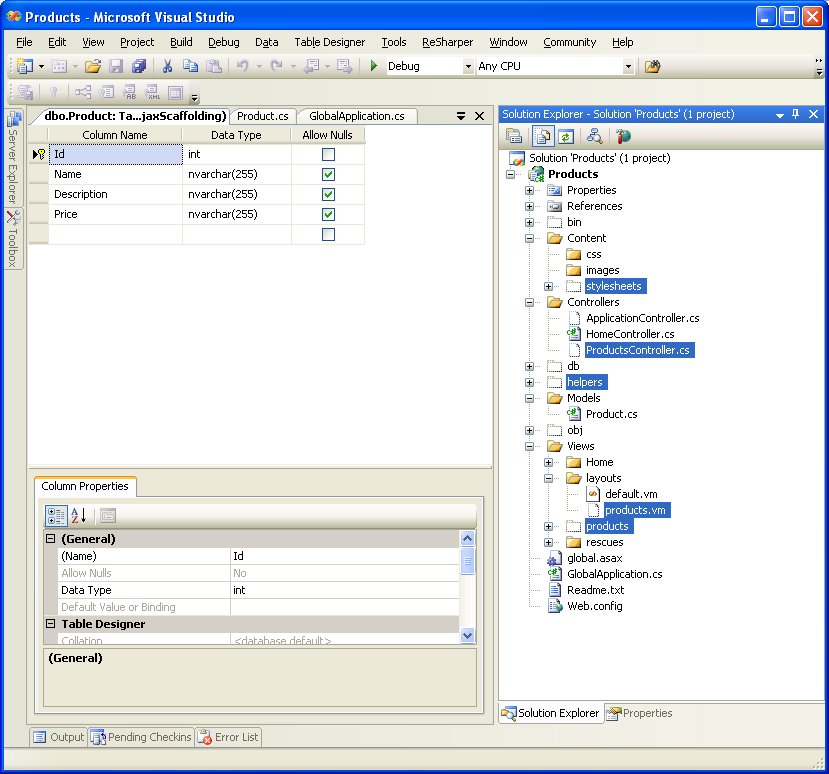
Unfortunetely, we'll still have to manually include the files in the project (still working on this):

3. Final adjustments

In order to make it work we need some adjustments to our Project class:

using System.Collections;
using Castle.ActiveRecord;
using NHibernate.Expression;

namespace Models
{
///
/// An instance of this class represents a Project.
///
[ActiveRecord]
public class Project : ActiveRecordValidationBase {
#region Fields
private int _id;
private string _name;
private string _description;
#endregion

internal static IList FindAll()
{
return FindAll(typeof(Project));
}

internal static IList FindAll(string property)
{
return property.Equals("") ? FindAll(typeof(Project), new Order[1] { Order.Desc("Id") }) : FindAll(typeof(Project), new Order[1] { Order.Asc(property) });
}

internal static Project Find(int id)
{
return FindByPrimaryKey(typeof(Project), id) as Project;
}

#region Persistent properties
[PrimaryKey]
public int Id {
get { return _id; }
set { _id = value; }
}
[Property]
public string Name {
get { return _name; }
set { _name = value; }
}
[Property]
public string Description {
get { return _description; }
set { _description = value; }
}
#endregion


}

}


Now we see the result:


Conclusion

The project is till in early stages, but it can still generate very good code and save a lot of time needed to generate the same all CRUD code, needed in any application.

Monday, December 18, 2006

Ajax Scaffolding with Castle MonoRail and C#

Download Sources, and view demos

Goal

Let's say we need to write an application very fast, that can do the basic CRUD operations for a Product. Ruby on rails (www.rubyonrails.org) came up with the excellent idea of scaffolding, and the idea was ported into the Castle Monorail project (www.castleproject.org). However, the default generator both in ROR and in MR, do not generate ajax based code. For ROR the solution is at: www.ajaxscaffold.com but nothing so far for MR. So I decided to take matters in my own hands...

Where do we start from?

The excellent generator by Marc Andre Cournoyer can generate projects, controllers, migrations, model etc and the templates can be changed to suit one's needs extremely easy. Starting from Marc Andre's generator I configured the templates to generate AJAX based code.

Let's see how it works, step by step starting from nothing.

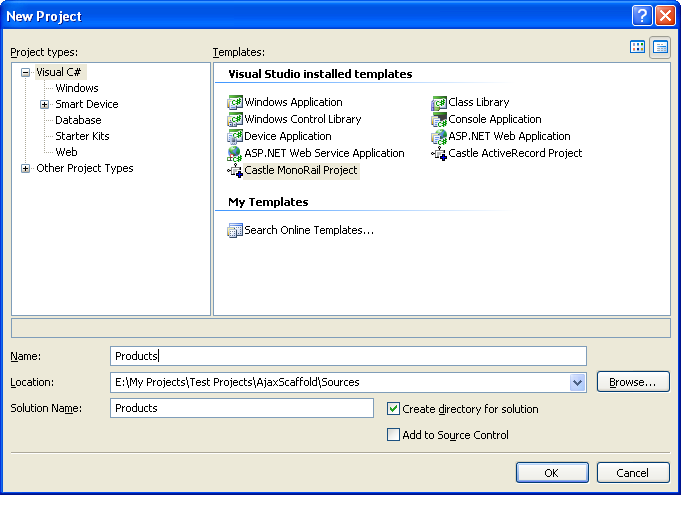
Step 1: we make a new MonoRail project

Using latest RC2, and VS.NET 2005, we generate the project using the wizard inside VS.NET.


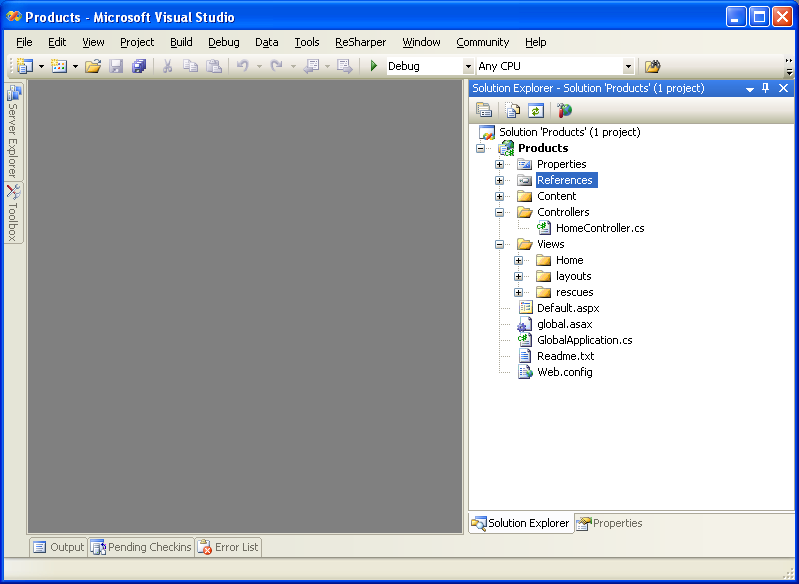
resulting in:


Then we edit the web.config and we create a new database called Products.

Step 2: we generate the persistent activerecord class and the database table

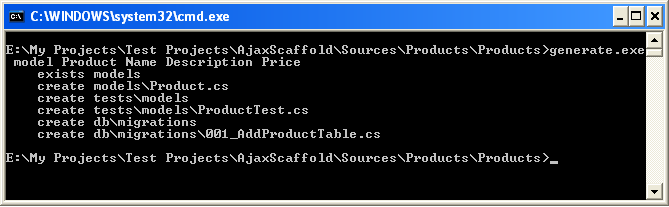
Starting for a basic Castle Monorail/ActiveRecord project, we start by creating the Product class, and then generating the database table corresponding to it. In the application's root folder, we type: generate model Product Name Description Price and it generates the code for us:


obtaining the following code (click view all files on the web project, and include the new file in project)

///
/// An instance of this class represents a Product.
///

[ActiveRecord]
public class Product : ActiveRecordValidationBase {
#region Fields
private int _id;
private string _name;
private string _description;
private string _price;
#endregion

#region Persistent properties
[PrimaryKey]
public int Id {
get { return _id; }
set { _id = value; }
}
[Property]
public string Name {
get { return _name; }
set { _name = value; }
}
[Property]
public string Description {
get { return _description; }
set { _description = value; }
}
[Property]
public string Price
{
get { return _price; }
set { _price = value; }
}
#endregion

internal static IList FindAll()
{
return FindAll(typeof(Product));
}

internal static Product Find(int id)
{
return FindByPrimaryKey(typeof(Product), id) as Product;
}

}

To generate the database schema we just use:

ActiveRecordStarter.CreateSchema();

and we have the table in our database.

Step 3: we generate the Ajax Scaffolding code

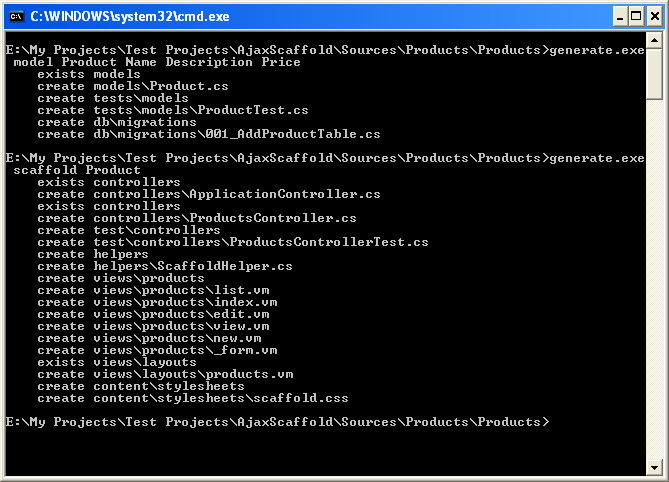
We type in our command window: generate scaffold Product and it will generate all the needed code dor adding, listing, editing and deleting products, using Ajax:


now we include the generated files in our solution from Visual Studio 2005 (right click, Include in project):


Step 4: we run the code. It works!

We start the application:

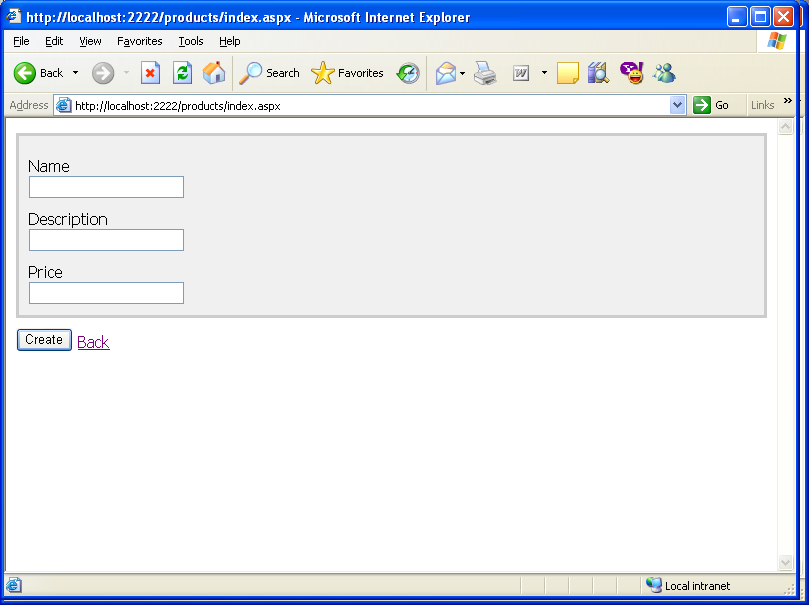
then we add:


after adding two products:

now viewing in place:


and editing:


and the same with deleting.

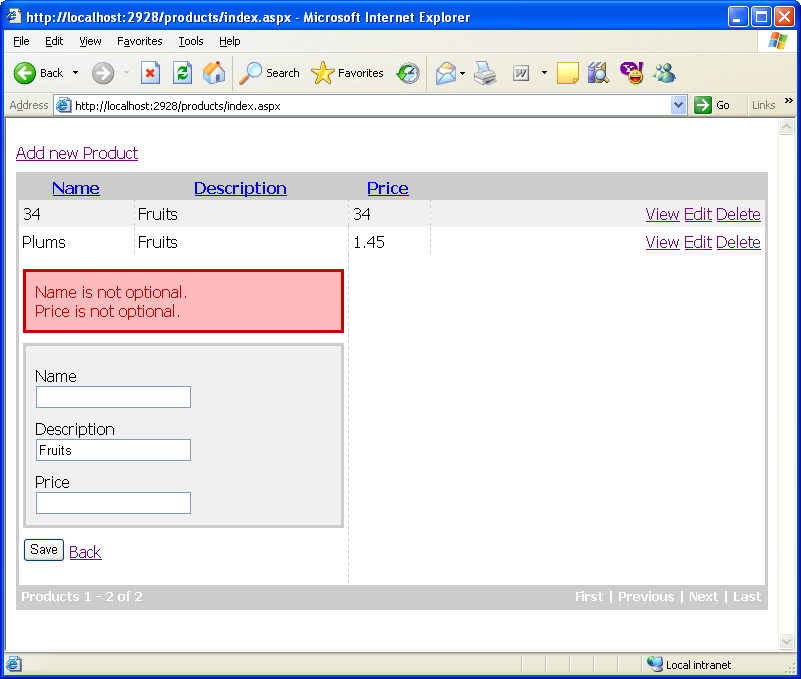
What about validations?

Let's say that the name and the price are required. We modify the Product class, to add the validation attributes:

///
/// An instance of this class represents a Product.
///

[ActiveRecord]
public class Product : ActiveRecordValidationBase {
#region Fields
private int _id;
private string _name;
private string _description;
private string _price;
#endregion

#region Persistent properties
[PrimaryKey]
public int Id {
get { return _id; }
set { _id = value; }
}
[Property,ValidateNotEmpty("Name is not optional.")]
public string Name {
get { return _name; }
set { _name = value; }
}
[Property]
public string Description {
get { return _description; }
set { _description = value; }
}
[Property, ValidateNotEmpty("Price is not optional.")]
public string Price
{
get { return _price; }
set { _price = value; }
}
#endregion

internal static IList FindAll()
{
return FindAll(typeof(Product));
}

internal static Product Find(int id)
{
return FindByPrimaryKey(typeof(Product), id) as Product;
}

}

and restart the application:


How hard is it to extend the product?

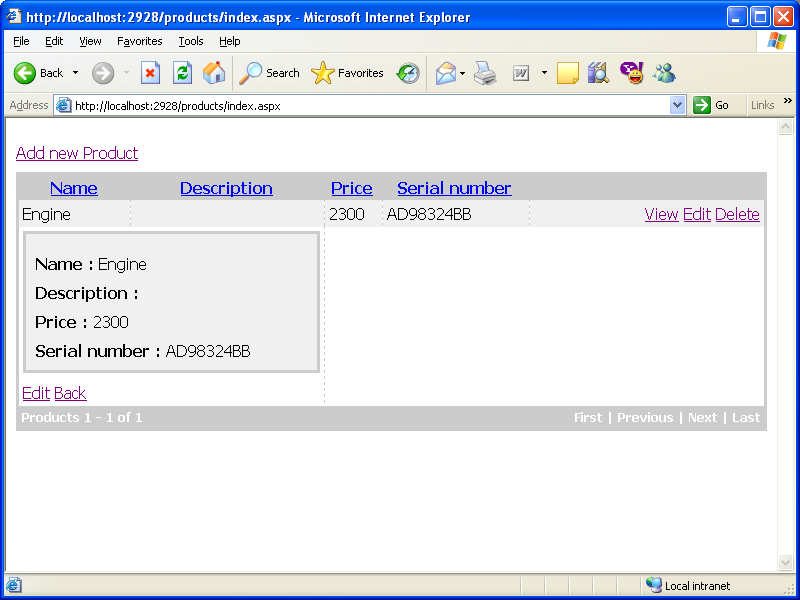
Let's say that we've just found out that besides the Name, Description and Price, we also need to add to each product a serial number. We modify the Product class, adding the new field and property:

private string _serialNumber;

...

[Property]
public string SerialNumber
{
get { return _serialNumber; }
set { _serialNumber = value; }
}

Now, we recreate the table:

ActiveRecordStarter.CreateSchema();

and start the application:

and


so it doesn't need any modification in the code or views.

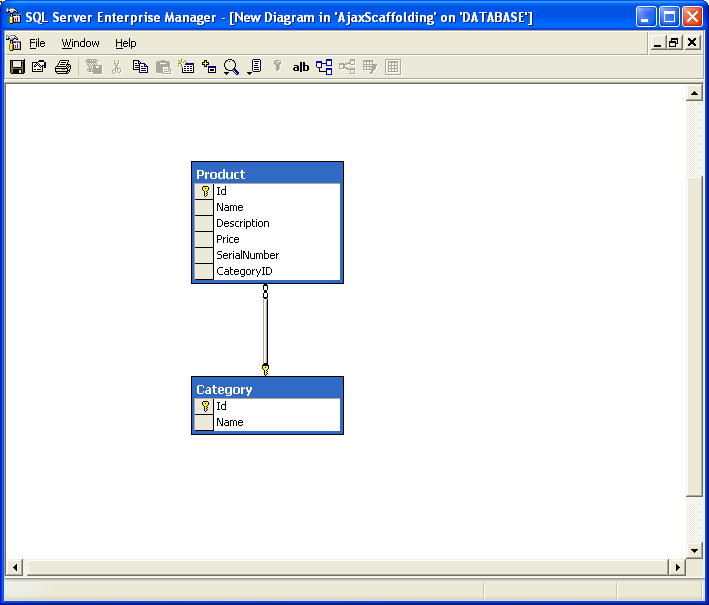
What about relationships?

Let's consider that we want each product to be part of a Category. Following the steps above we create a class Category:

[ActiveRecord]
public class Category : ActiveRecordValidationBase {
#region Fields
private int _id;
private string _name;
private IList products = new ArrayList();
#endregion

#region Persistent properties
[PrimaryKey]
public int Id {
get { return _id; }
set { _id = value; }
}
[Property]
public string Name {
get { return _name; }
set { _name = value; }
}

[HasMany(typeof(Product))]
public IList Products
{
get { return products; }
set { products = value; }
}

#endregion

public override string ToString()
{
return this.Name;
}

and modify the product to be part of a Category by adding:

private Category _category=null;
...
[BelongsTo("CategoryID")]
public Category Category
{
get { return _category; }
set { _category = value; }
}

we regenerate the database, obtaining:


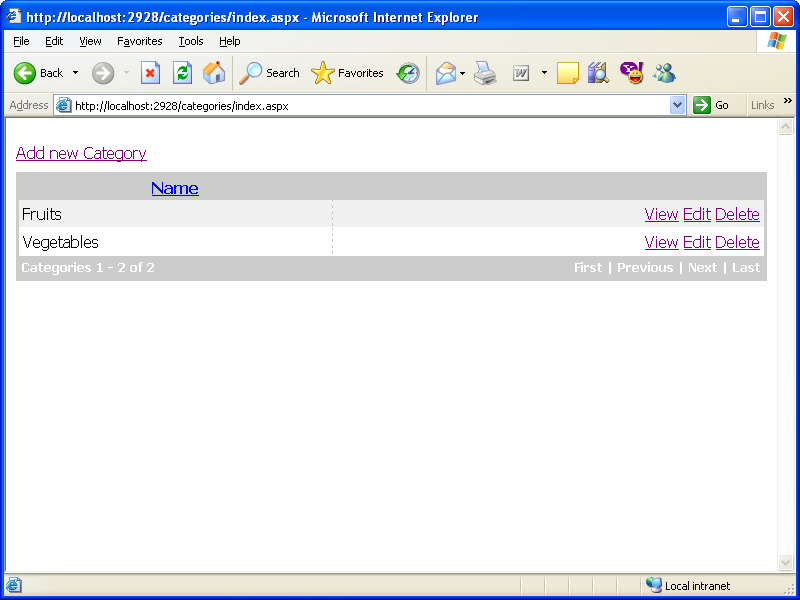
Using the generator we also generate the ajax scaffolding code to add/edit/delete and list categories. Now we add two categories:


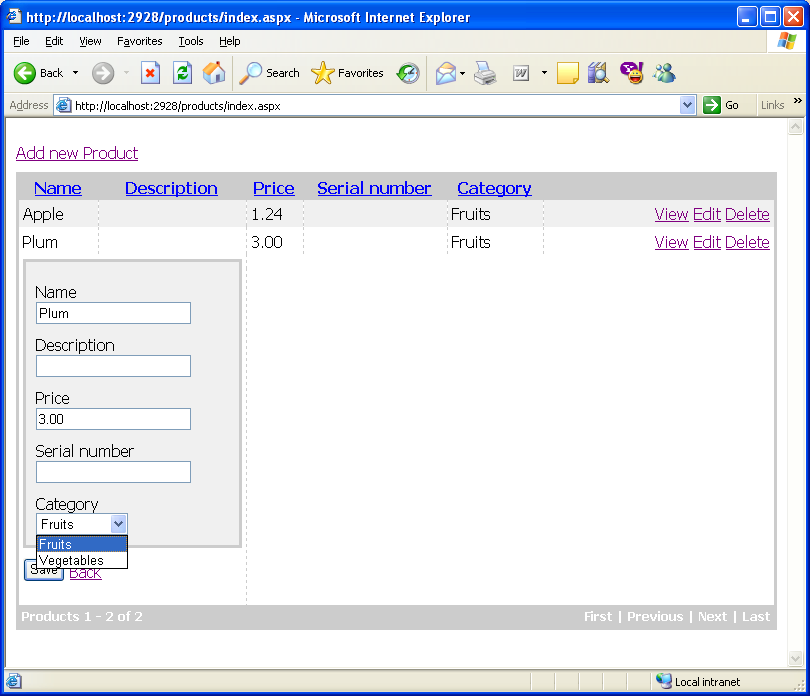
and going to add new products we'll also have the category combobox, without us making any modification in the code or the views:


Conclusion

As it can be seen above, with very little effort, in 10 minutes we can create an easy to extend ajax application (thanks to Castle Project and Marc Andre's generator). The code is quite clear and easy to debug and extend, and since it is ajax based it can be easily integrated in existing web applications.